Skip to content

Invoicing software for small businesses that shows what’s outstanding

A customer calls to ask if their deposit has arrived. To answer reliably, you need the correct invoice, the total, and any payments recorded against it. In CleverHub you can create invoices, record incoming payments, and check their status. That helps when the person answering the phone is someone other than the person who wrote the invoice.

Book a demo
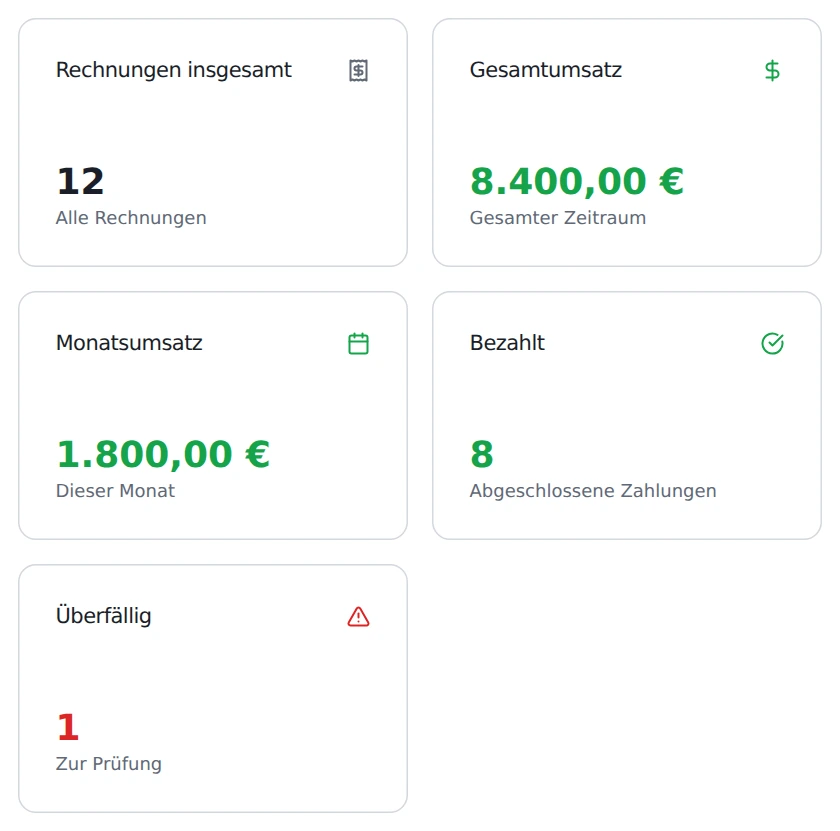
Invoice overview with sample revenue totals and counts of paid and overdue invoices.
Detail from the invoice overview. All invoice counts and amounts are sample data. German interface shown.

What changes in your day-to-day work

Keep quotes and invoices distinct

Record the services on offer before the job and check which ones were actually delivered afterward. Your team can handle quotes and invoices as different document types. That leaves a record of what you discussed at first and what you ultimately billed.

Match the incoming payment

For a bank transfer, the invoice number helps you find the right document. Check the amount and recipient before recording the payment. If the customer pays in installments, record the amounts received as partial payments.

Review overdue invoices

The overview shows which invoices are marked overdue. That gives the office a concrete starting point for follow-up. Before getting in touch, check the payments on file and whether the original arrangement has changed.

How it works

  1. Check services and recipients

    Open the new document dialog and choose the appropriate document type. Check the line items against the work ordered, especially additions that came after the original agreement.

  2. Share the finished document

    Check the invoice number, line items, and due date. Open the PDF and read it from the recipient’s perspective. Is it clear what work was done and which job it was for?

  3. Record payments as they arrive

    Once you know the payment has arrived, find the invoice and record it. Then compare the invoice status with the amount transferred. If it’s a partial payment, the team can open the invoice again later and record the remaining payment.

Features in detail

Write clear line items

A line such as “Workshop preparation and evaluation” helps the recipient more than an internal project name. Record each service, quantity, and amount in the invoice. As you write, check that the description matches the agreed scope. A clear invoice makes it easier to talk about the job later.

Outstanding, partly paid, or settled

Filter by status in the invoice list. For instance, review partly paid invoices separately from settled ones. Open the specific invoice for any follow-up. The total number of paid invoices alone can’t tell you whether this particular payment has been recorded.

Use the invoice for handoffs

The invoice PDF presents the details in a form you can review or share. If the recipient has a question, look up the invoice number. Agree who will work through any correction and who will then record the payment.

Example from a training company

A fictional training company prepares a workshop for a business. Its quote covers preparation, a day of training, and a follow-up meeting. Shortly before the workshop, the client asks for an extra exercise. The office confirms the expanded scope and invoices for the services actually delivered.

The first transfer covers part of the invoice. A staff member opens the invoice, checks the reference, and records the payment. When the client calls later, the colleague covering can look up the status on the same invoice. For the follow-up, she asks for the invoice number and clarifies the remaining balance.

Two people look over documents and a tablet in an office.

Frequently asked questions

Can I prepare a quote first?

Yes. Choose between a quote and an invoice when creating the document. Use a quote while you’re still agreeing on the services. Before billing, check which line items the customer actually ordered.

How do I handle a partial payment?

Open the associated invoice and record the amount that actually arrived. Later, filter by status to find partly paid invoices and match another incoming payment.

How can a colleague covering for me find overdue invoices?

Select the relevant status in the invoice list. Before contacting a recipient, check whether a payment has arrived but is still waiting to be recorded.

Can I review the document before sharing it?

Use the PDF for the final check. Read the recipient’s name, item descriptions, and amount. A colleague who knows the job can often spot unclear wording quickly.

What documents do I need for the demo?

A fictional job with two different services is enough. If you include a partial payment, we can walk through the entire process from the quote through to checking what remains outstanding.

Which invoice would you like to walk through together?

Book a demo