Keep track of the conversation
Messages appear in chronological order in the chat. Even when the early shift started the inquiry, the next person can read what the customer asked and what she was already told.
A customer writes on WhatsApp because her plans have changed. Early that morning, she already explained what she needed to the assistant. Whoever answers later can read those messages and focus on the remaining question. CleverHub brings the WhatsApp history and the linked contact together for your team.
Book a demo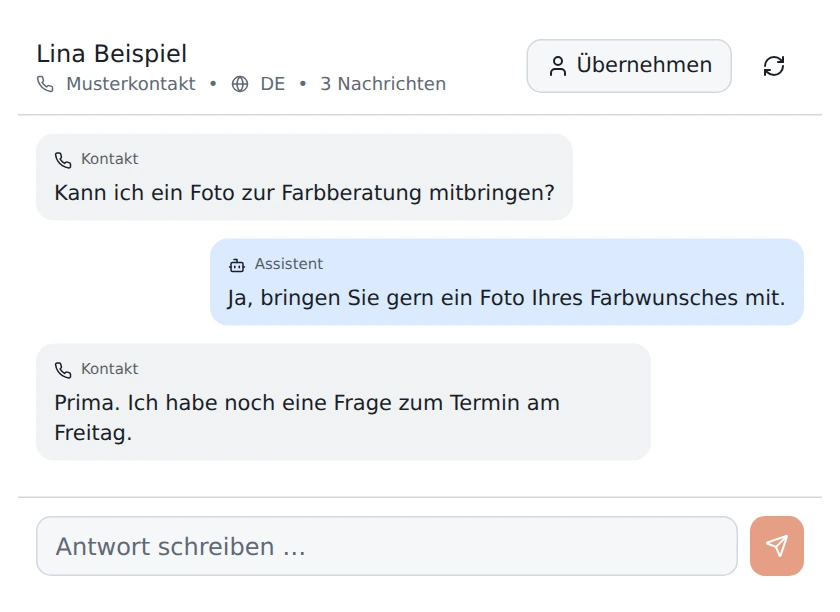
Messages appear in chronological order in the chat. Even when the early shift started the inquiry, the next person can read what the customer asked and what she was already told.
The WhatsApp assistant can ask what the person needs and answer using information about your business. With very brief messages, a focused follow-up question can help before someone on your team prepares advice.
The workspace shows the conversation’s status. When you take over to reply personally, your team can see in the history where the conversation with the assistant ended and what happened next.
Choose the WhatsApp channel in the inbox. Find the conversation you want to handle and read the exchange so far. Check that the linked contact matches the inquiry.
A general question about a visit can often be answered using the business information on file. Take over personally when someone needs an individual recommendation or a change to a specific arrangement. Agree within the team on who handles those inquiries.
Write your personal message directly in the open conversation. Refer to a particular point in the inquiry. A single question that is easy to answer makes it easier for the customer to continue on their phone.
The channel view helps you focus on WhatsApp. Choose the status you want to work through. At a shift change, for instance, review chats still waiting for a personal reply and read the latest messages together.
A customer writing on the go might be more brief or use a different language than when visiting in person. The assistant bases its reply on the language of the message. When a team member takes over, they can read the original wording and ask about any unclear terms.
If a contact is linked, it gives your team more context alongside the messages. Check the link before discussing details of an arrangement. Record special requests as the customer described them. The original wording stays available in the history.
Suppose a customer asks about a color consultation over WhatsApp. The assistant asks what result she wants. She explains that she wants to keep her natural shade and lighten just a few sections. Her preference is clearer, and the stylist still needs to decide on the treatment.
The stylist reads the conversation, takes over, and asks whether the customer’s hair was dyed recently. She can then suggest a consultation in person. If a colleague steps in later, the same chat contains both the follow-up question and the description of the color the customer would like.

Yes. With the WhatsApp channel connected, open a conversation, take over, and write your reply there. The customer continues in their usual WhatsApp chat.
Open the relevant conversation history. Incoming messages and earlier replies appear together. Check the last question before taking over, especially after short answers such as “yes” or “tomorrow.”
Take over when a question requires your team to make a judgment or a commitment. In a salon that might be a color correction, and in a trade business it might be assessing an unusual installation.
Choose the WhatsApp channel in the shared inbox and check the conversation status. This helps when one person handles WhatsApp and another takes care of website chat that day.
Make up a short conversation from your day-to-day work. Start with a general question and add an individual request. We can use it to show where your team would want to take over.