Find the outstanding callback
Someone who calls between appointments needs a reliable follow-up. Add the inquiry as a lead and record where things stand. When you next speak, you can see whether anyone has already talked to them.
It’s Monday morning at the office. A prospective customer calls about a quote. Your colleague remembers the inquiry but is already out on a job. The lead in CleverHub shows where the conversation stands. From there you can decide whether the next step is a callback, a site visit, or a quote.
Book a demo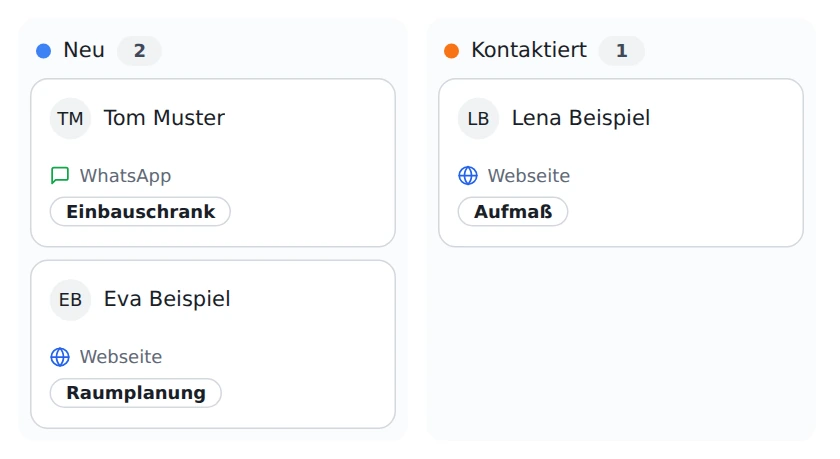
Someone who calls between appointments needs a reliable follow-up. Add the inquiry as a lead and record where things stand. When you next speak, you can see whether anyone has already talked to them.
The cards on the lead board are grouped by status. In a team meeting, you can review new inquiries first, then check the ones you have already contacted. That gives stalled inquiries another look.
Office and field staff need different information for a customer visit. Use the contact for contact details, the calendar for the appointment, and a task for anything to clarify beforehand.
Start with the details you actually have from the first conversation. A name, a way to call back, and a clear description of what the person needs are more helpful in a handoff than guesses about a potential job.
Open the lead once the callback is done and move it to the appropriate stage. If the prospective customer has agreed to a site visit, put the appointment in the calendar as well.
Create a quote once the scope is clear. Before sending it, check with your team which option was discussed. Add a task if you want to follow up and pick up the inquiry again later.
Someone may have been a customer for years and still call with a new request today. The contact tells you who you are speaking to. The lead shows how far that particular inquiry has progressed. That distinction is especially useful when an existing customer starts another project.
The New column is a good first stop after lunch. Then look under Contacted for inquiries where a first conversation has already happened. The card gives you context. The person handling the inquiry decides whether to call or to wait for documents.
A task records the next action, such as asking for a missing measurement. An appointment reserves time for a call or visit. Both belong in the CRM. Log the callback as a task, then put the appointment in the calendar once both sides have agreed on a time.
Suppose a homeowner asks for a built-in wardrobe under a sloped ceiling. The office creates a lead. During the first call, it becomes clear that a photo of the room is still needed. The staff member marks the lead as Contacted and creates a task to follow up on the photo.
Once the photo arrives, the carpenter arranges a visit to take measurements. The office records the appointment. The measurements lead to two design options. If someone else takes the next call, they can open the contact first and ask which option the homeowner wants explained.

Small teams benefit especially when several people take turns answering the phone or preparing quotes. Agreeing together on when a lead counts as contacted already makes the board easier for someone covering for a colleague to read.
Choose a manageable inquiry that already has a concrete next step. Check the contact details, add the new request, and use that case in your first team discussion.
New inquiries have their own column on the lead board. Whoever is handling callbacks that day can start there. After the conversation, they update the status to reflect what actually happened.
Record arrangements with a specific time, such as a site visit. If the other person has yet to confirm, use a task to remember to follow up.
Yes. Bring a fictional example that reflects your daily work. An inquiry with a first contact, a follow-up question, and a quote that two people work on together makes a good example.