SEO websites and online stores connected to your CRM
Visitors often have another question after finding a service on your website. Will the dining table fit in a small kitchen? Can someone explain the different types of wood before they buy? Webwest plans and builds your site as an agency service. Together, we decide where visitors can get in touch and how your team picks up the conversation in CleverHub.
A business may describe its services in specialist terms. A customer may simply be looking for a made-to-measure table. We gather questions like that and match them to individual pages on the SEO website. Each service gets a clear title and enough room to answer the question.
Offer a suitable way to get in touch
A chat window works for a quick question about a finish. Someone arranging a measuring visit needs a callback. Choose a suitable way to get in touch for each situation as you plan the site. A product description in an online store can also point visitors to a consultation.
Plan how your team will follow up
When your sales team calls back, they should already know what the customer needs. When designing the lead form, decide what information the team needs for that first conversation. An inquiry submitted through the form is available as a lead in CleverHub.
How it works
Define the content and scope
Bring a product or service that represents your business. We’ll discuss who is looking for it, what they need before making a decision, and which image will show it clearly. That gives us a starting point for the first page.
Build the website or online store
Webwest handles the agreed design and builds the pages. For an online store, we also decide which product categories and information you need at launch. The people preparing the copy, photos, and variants can then see what to gather next.
Test the path from the site to your team
Walk through a sample before launch. Open the site on your phone, ask a typical question, and submit a fictional consultation request through the lead form. The person who will call back checks in the CRM whether the information is enough to get started.
Where the website connects to CleverHub
Forms and leads
A lead form gives visitors a way to get in touch. A general-purpose form can support a different task, such as preparing for an appointment. Choose which form to integrate based on what it needs to do and decide who handles the responses.
Website chat
You can embed the chatbot widget on the website. Add questions your team hears often and the relevant information about your services. For a made-to-measure table, the chat might explain which measurements help prepare a consultation.
Reply to reviews
Your team can read and reply to reviews from the connected Google account in CleverHub. If several customers ask how to care for a finish, use that feedback to update the content. Add the explanation to the relevant product page.
From a table on a product page to a consultation
Imagine a woodworking business with an extendable table in its online store. Two photos show the table closed and fully extended. A visitor wants a different length. She uses the form to describe what she needs and leave a way to call back.
A member of the sales team sees the new lead. When he calls back, he asks how much space the customer has and discusses the desired dimensions. The example shows one decision to make when building the store. A visitor considering a custom order needs a way to ask about it directly from the product page.
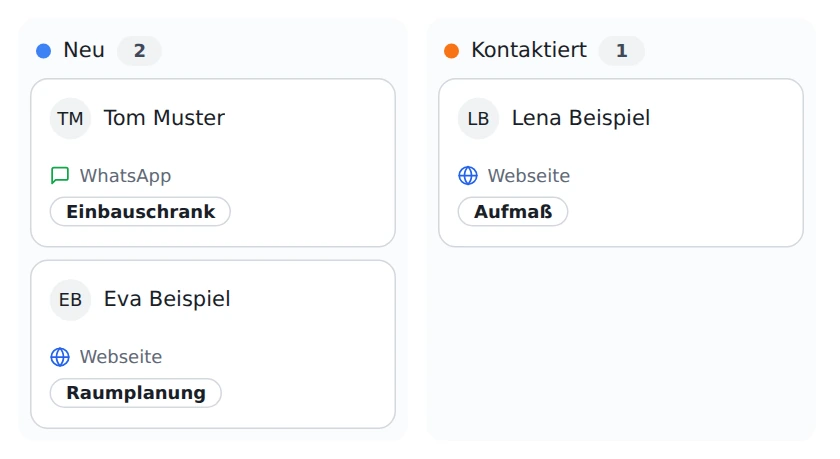
Your team follows up in the CRM after an inquiry. The sample board shows new leads and leads your team has already contacted. German interface shown.
Webwest builds it within the agreed project scope. CleverHub provides the CRM connection for the contact channels you select. The project determines which pages you need and who supplies the content.
Can I start with one service?
Yes. Choose a service people often need explained. We can use it to discuss page structure, image selection, and how visitors can make an inquiry before you prepare any more content.
What makes the website search engine optimized?
We give each specific search intent a suitable page. A descriptive page title, clear headings, original descriptions, and links to related content help visitors and search engines understand the offer.
When should I use chat or a form?
Chat is useful for questions that come up while someone reads. If they want a callback, the lead form gives them a direct way to tell your team what they need and how to reach them.
What should I bring to the demo?
Choose a public product page, a sketch, or a typical question about what you offer. Briefly describe who will handle the inquiry so we can walk through the handoff from the website to sales together.
How does an inquiry get from your website to the right team?